Account & Profile
Create your account, sign in, manage your profile, connected apps, and notifications.
Account Overview↗
Overview
Your Key AI account is your gateway to the platform, providing access to communities, events, opportunities, and other features based on your assigned permissions. It also allows you to personalize your experience by managing your profile information, notification preferences, and connected accounts. Keeping your account information up to date helps you get the most out of Key AI and ensures other members can easily connect with you.
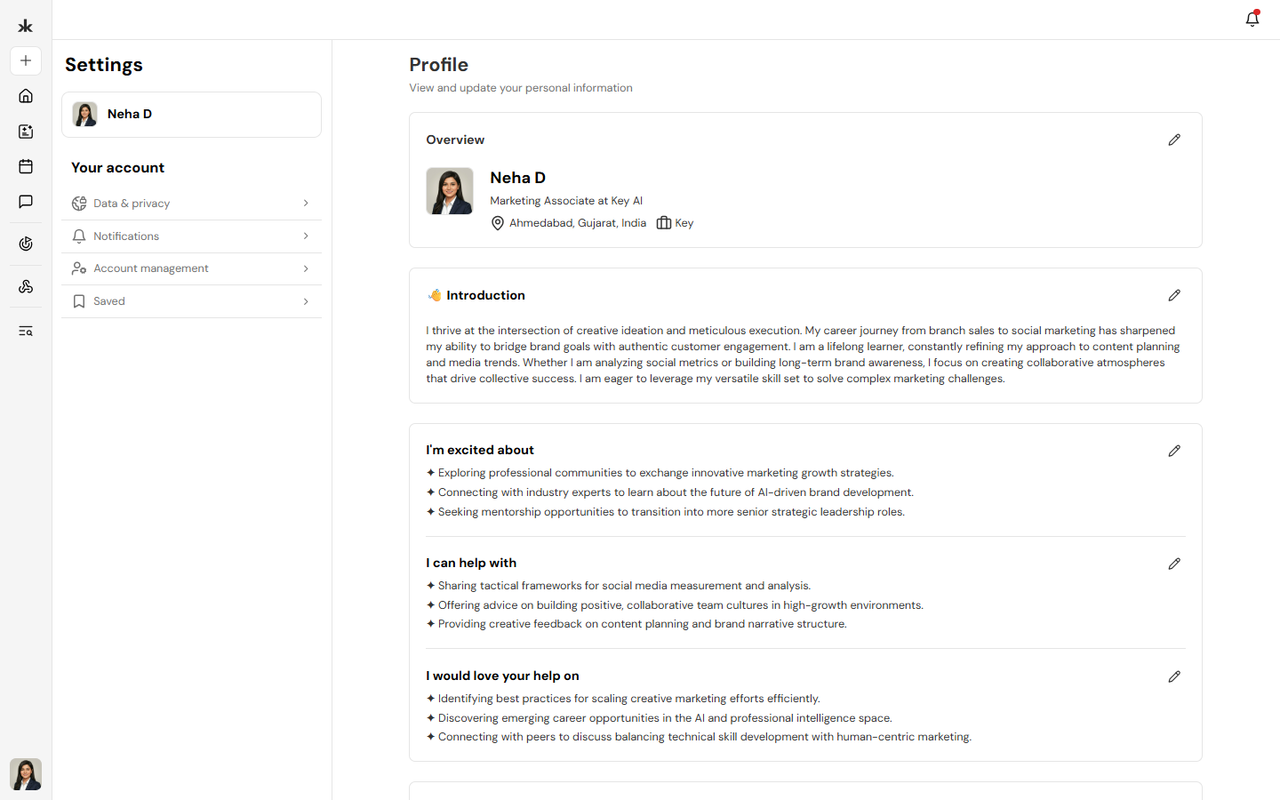
What You Can Manage
From your account, you can:
- View and update your profile information.
- Manage your profile photo.
- Update your notification preferences.
- Manage your connected accounts.
- Access your account settings.
Why Keep Your Account Updated?
Maintaining an up-to-date account helps you get the most out of Key AI.
A well-maintained account allows you to:
- Keep your profile information current.
- Improve your visibility within communities.
- Receive important platform and event notifications.
- Ensure your account information is accurate.
- Help Key AI curate and recommend more relevant opportunities based on your profile, interests, and professional information.
Tip: The more complete and up-to-date your profile is, the better Key AI can recommend relevant opportunities, helping you discover meaningful connections and professional engagements.
Account Settings
Your account settings allow you to personalize your Key AI experience and manage your account preferences.
From your account settings, you can:
- Edit your personal information.
- Update your profile picture.
- Configure your notification preferences.
- Manage your connected accounts.
- Review and update your account settings.
Keeping your account settings up to date ensures your profile information is accurate and helps you stay informed about important activity across the platform.
Best Practices
To get the most out of Key AI, we recommend that you:
- Keep your profile information up to date.
- Add a professional profile photo.
- Review your notification preferences regularly.
- Update your profile whenever your role, skills, or professional information changes to receive more relevant opportunities and recommendations.
Create an Account↗
Overview
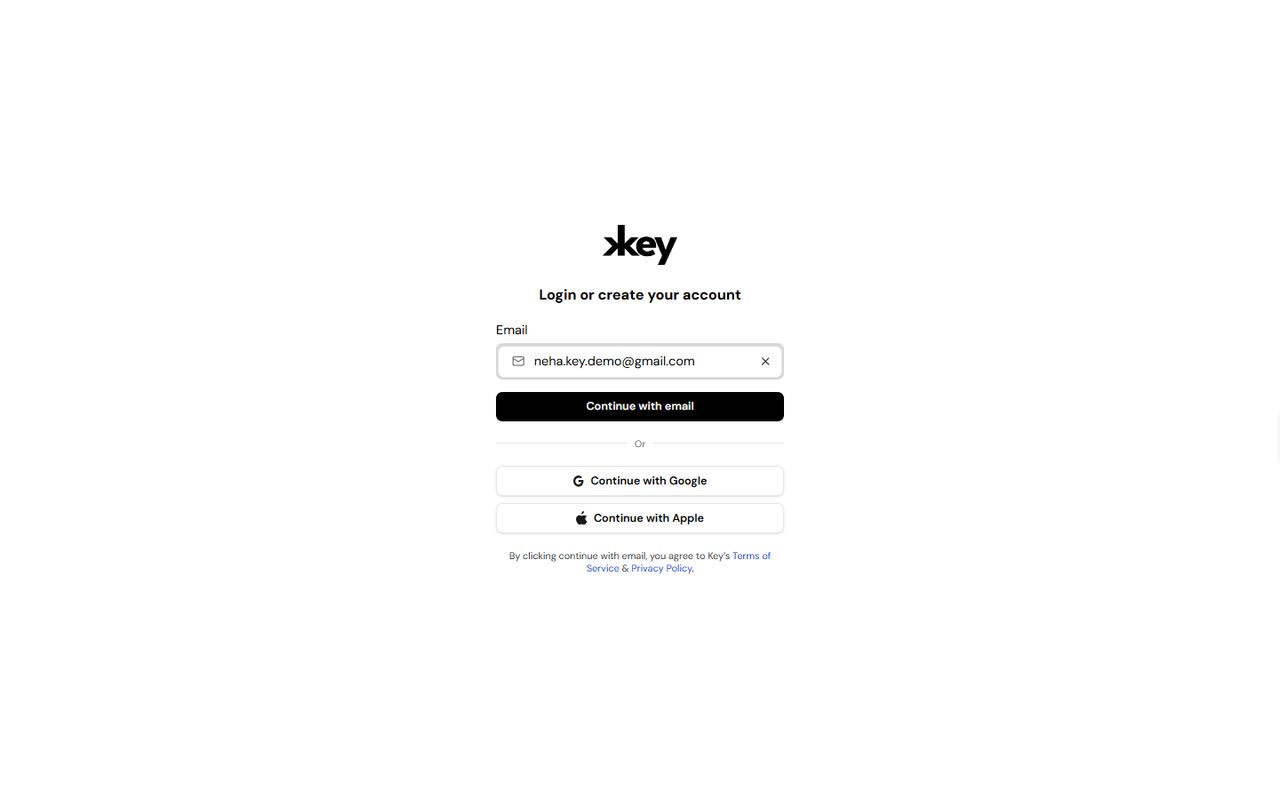
Creating a Key AI account gives you access to communities, events, opportunities, and other platform features. You can create an account using your email address or by signing in with a supported authentication provider. If you already have an account, you can use the same screen to sign in.
Create an Account Using Your Email
To create an account using your email address:
- Open the Key AI login page.
- Enter your email address.
- Click Continue with email.
- Verify your email by entering OTP.
- Follow the on-screen instructions to complete your account setup.
- Once your account has been created, you'll be signed in to Key AI.
Create an Account Using Google
If you have a Google account, you can create your Key AI account by:
- Opening the Key AI login page.
- Clicking Continue with Google.
- Selecting your Google account.
- Following the authentication prompts.
- Once authentication is complete, you'll be signed in to Key AI.
Create an Account Using Apple
If you use an Apple account, you can create your Key AI account by:
- Opening the Key AI login page.
- Clicking Continue with Apple.
- Signing in with your Apple ID.
- Completing the authentication process.
- Once authentication is complete, you'll be signed in to Key AI.
Things to Know
- The same page is used for both signing in and creating a new account.
- You can choose the sign-in method that best suits your preference.
- Depending on the email address you use, Key AI will guide you through either creating a new account or signing in to an existing one.
Best Practices
- Use the same sign-in method each time you access Key AI.
- If you signed up using Google or Apple, continue using the same provider for future logins.
- Ensure you have access to the email address associated with your account.
Frequently Asked Questions
Can I create an account using my email address?
Yes. Enter your email address on the login page and click Continue with email to begin the account creation process.
Can I sign up using Google or Apple?
Yes. Key AI supports account creation using both Google and Apple accounts.
I already have an account. Do I need to create another one?
No. Simply use the same login page and sign in using the method associated with your existing account.
Log In↗
Overview
If you already have a Key AI account, you can sign in using the same authentication method you used when creating your account. Key AI supports multiple sign-in methods, allowing you to securely access your communities, events, and other platform features.
Sign In Using Your Email
To sign in using your email address:
- Open the Key AI login page.
- Enter your registered email address.
- Click Continue with email.
- Complete the authentication process.
- Once authentication is complete, you'll be signed in to your Key AI account.
Sign In Using Google
To sign in using your Google account:
- Open the Key AI login page.
- Click Continue with Google.
- Select the Google account associated with your Key AI account.
- Complete the authentication process.
Sign In Using Apple
To sign in using your Apple account:
- Open the Key AI login page.
- Click Continue with Apple.
- Sign in using your Apple ID.
- Complete the authentication process.
Tips
- Use the same sign-in method you used when creating your account.
- Ensure you're using the correct email address associated with your account.
- If you're unable to sign in, verify your credentials and try again.
Frequently Asked Questions
Can I switch between email, Google, and Apple sign-in?
For the best experience, use the same sign-in method associated with your Key AI account.
I'm unable to sign in. What should I do?
Verify that you're using the correct email address and authentication method. If the issue persists, contact support@key.ai for assistance.
Can I access my account from multiple devices?
Yes. You can sign in to your Key AI account from supported devices using your preferred authentication method.
Complete Your Profile↗
Overview
Your profile is your professional identity on Key AI. Completing your profile helps other members learn more about you, build meaningful connections, and enables Key AI to curate more relevant opportunities and recommendations based on your professional background and interests. When setting up your profile, you can either use Key AI's AI-powered profile enrichment or complete your profile manually.
Why Complete Your Profile?
A complete profile helps you:
- Build your professional presence within the platform.
- Make it easier for other members to discover and connect with you.
- Showcase your professional background and expertise.
- Improve networking opportunities across communities and events.
- Receive more relevant opportunities and recommendations curated by Key AI.
Complete Your Profile with AI
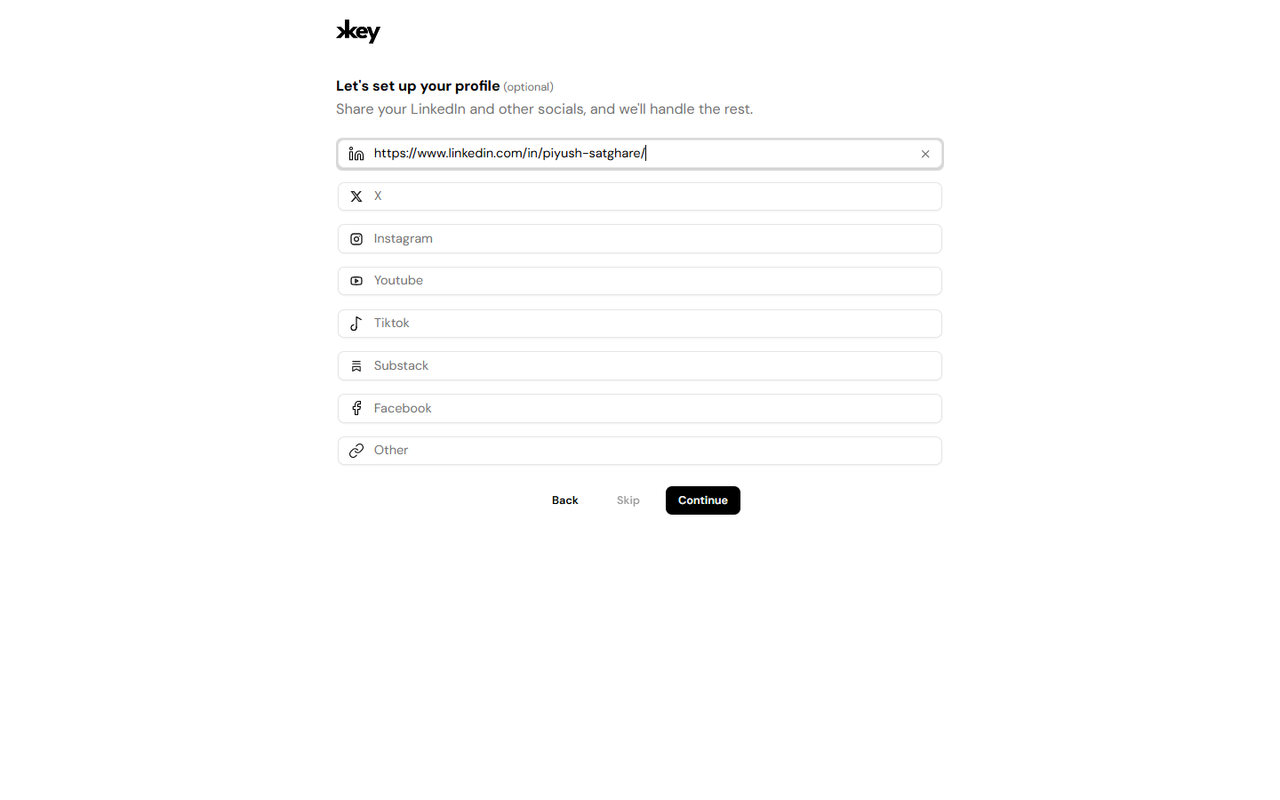
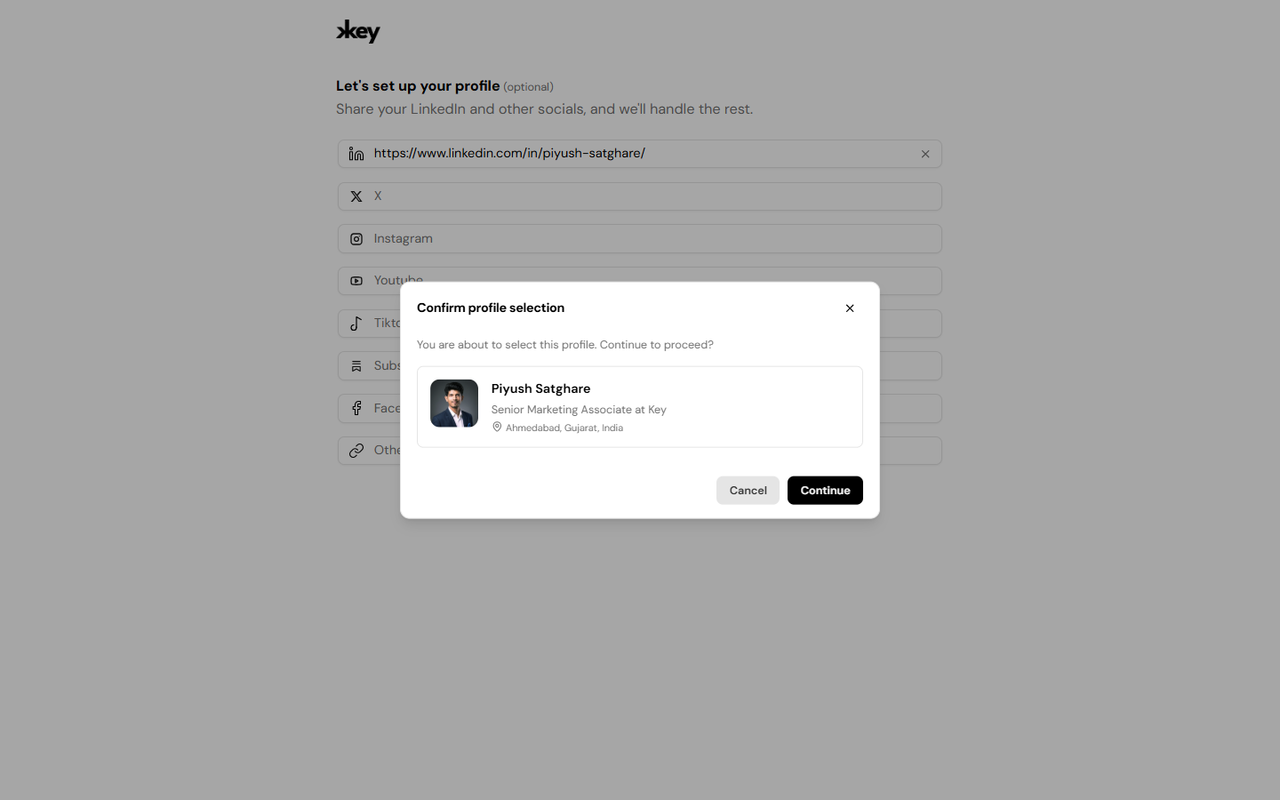
Key AI allows you to quickly build your profile by providing a link to your professional profile, such as your LinkedIn profile.
During profile setup:
- Open the profile setup flow.
- Paste your professional profile link in the provided field.
- Click Continue.
- Key AI will automatically extract available professional information to create your profile.
- Review the imported information and continue.
This helps you get started faster without manually entering your profile details.
Complete Your Profile Manually
If you prefer, you can skip profile enrichment and complete your profile manually. Simply enter the available profile information and save your changes.
Profile Photo
When using AI-powered profile enrichment, Key AI may import your profile photo from the professional profile you provided. If you'd like to use a different image, you can upload or replace your profile picture at any time from your profile settings.
Edit Your Profile
Your profile can be updated whenever your professional information changes. We recommend reviewing your profile periodically to ensure your information remains accurate and up to date.
Best Practices
For the best experience:
- Keep your professional information current.
- Review your profile regularly and update it as needed.
- Use a professional profile photo.
- Add accurate information to improve networking opportunities.
- Keep your profile up to date to help Key AI curate more relevant opportunities and recommendations.
Frequently Asked Questions
Do I have to complete my profile manually?
No. You can use Key AI's AI-powered profile enrichment to automatically create your profile from a supported professional profile link, or you can enter your information manually.
Can I edit my profile after it has been created?
Yes. You can update your profile information and replace your profile picture at any time.
Can I change my profile picture?
Yes. Even if your profile picture was imported during profile enrichment, you can upload a different picture whenever you like.
Edit Your Profile↗
Overview
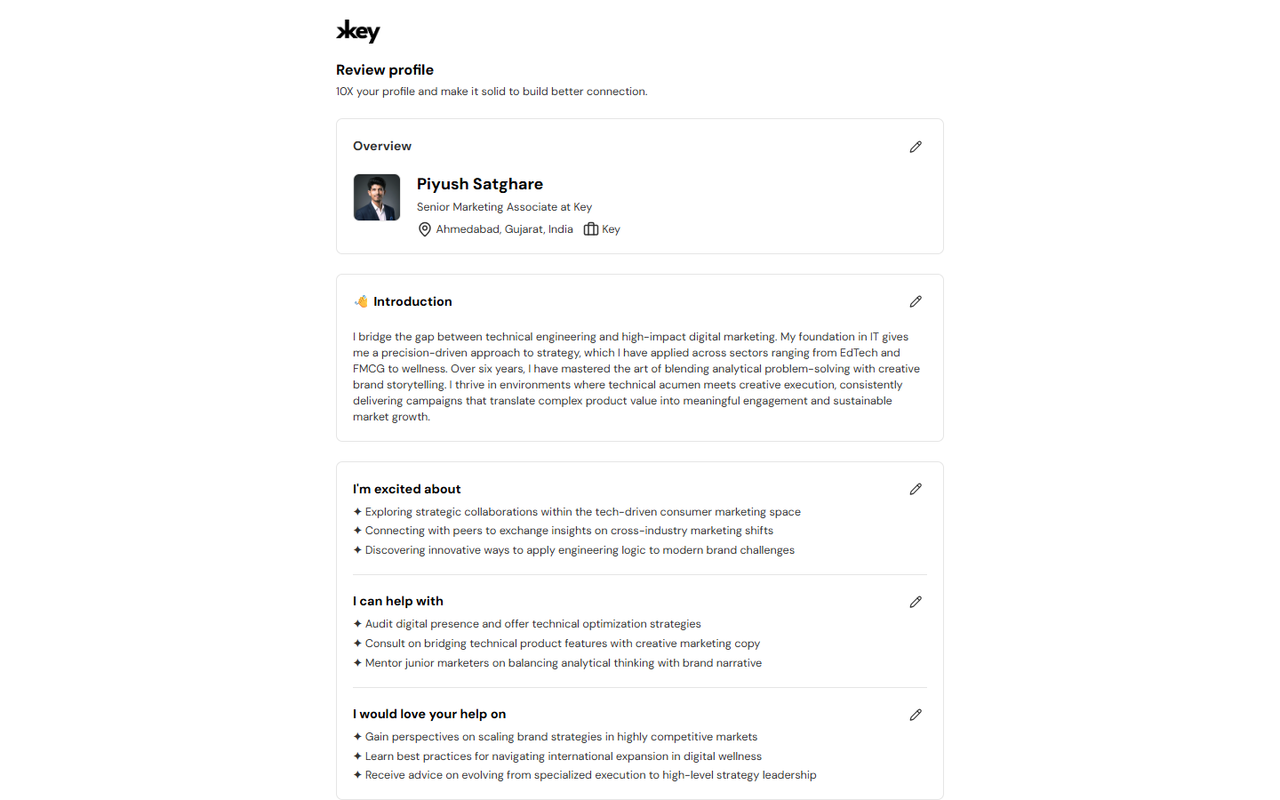
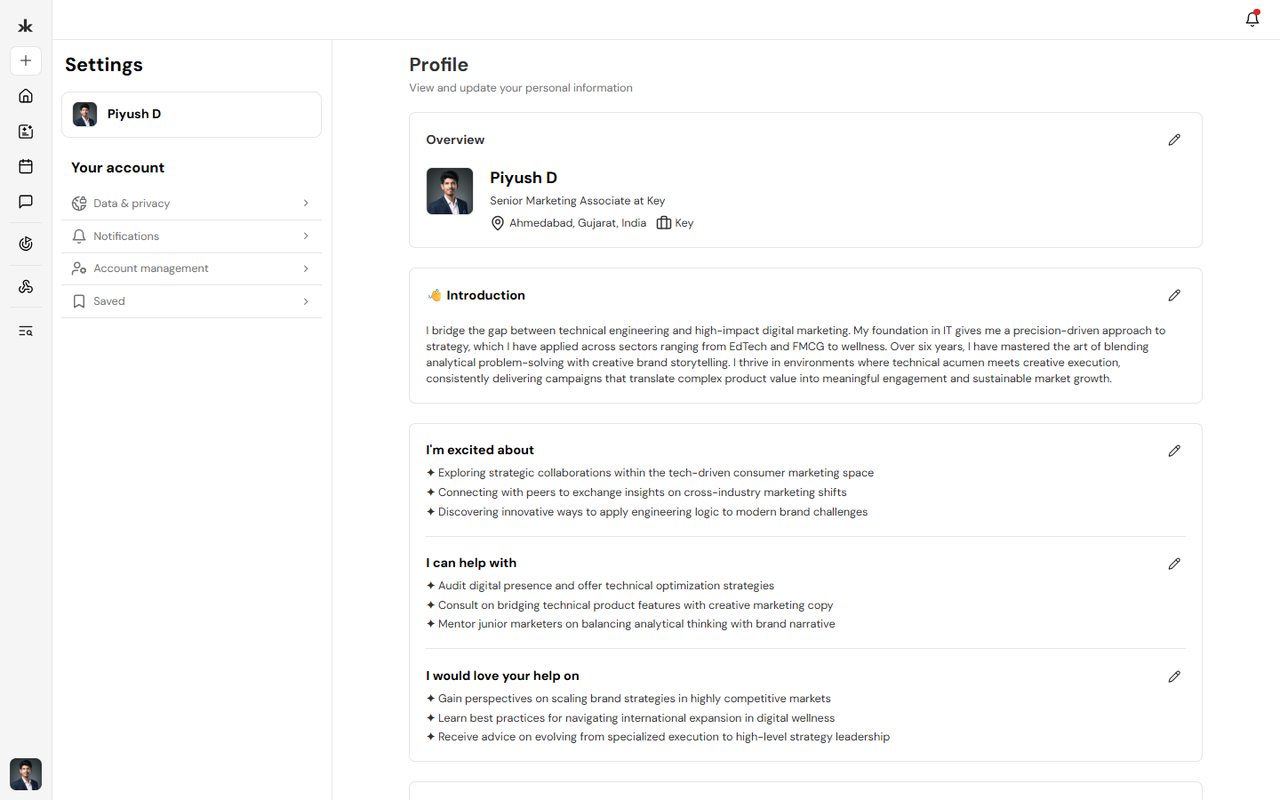
Your profile should reflect your latest professional information. As your experience, interests, or contact details change, you can update your profile at any time to keep your information accurate and help other members connect with you. Keeping your profile updated also helps Key AI provide more relevant opportunities and recommendations.
Edit Your Profile
To update your profile:
- Sign in to your Key AI account.
- Open your Profile.
- Click Edit Profile.
- Update the information you want to change.
- Save your changes.
Your updates will be reflected on your profile once they have been saved.
Update Your Profile Information
You can update your profile information whenever needed, including:
- Personal information.
- Professional information.
- Bio or introduction.
- Areas of expertise and interests.
- Contact information.
- Social profile links.
Keeping this information current helps other members better understand your background and improves your networking experience.
Change Your Profile Picture
You can change your profile picture at any time.
To update your profile picture:
- Open your profile.
- Select your current profile picture.
- Click on edit profile.
- Upload a new image or replace the existing one.
- Save your changes.
If your profile picture was imported during profile enrichment, replacing it will override the imported image.
Why Keep Your Profile Updated?
Updating your profile helps you:
- Maintain an accurate professional profile.
- Help other members recognize and connect with you.
- Improve the relevance of opportunities recommended by Key AI.
- Ensure your latest professional information is available across the platform.
Best Practices
- Review your profile regularly.
- Keep your professional information current.
- Update your profile picture when needed.
- Add relevant skills, interests, and experience as they evolve.
- Ensure your profile accurately represents your professional background.
Frequently Asked Questions
How often should I update my profile?
Update your profile whenever your professional information, role, organization, or interests change.
Will changing my profile affect my communities?
No. Updating your profile only changes your profile information and does not affect your community memberships. Can I replace the profile information imported during profile enrichment? Yes. You can edit any imported information and replace your profile picture at any time.
Connected Accounts↗
Overview
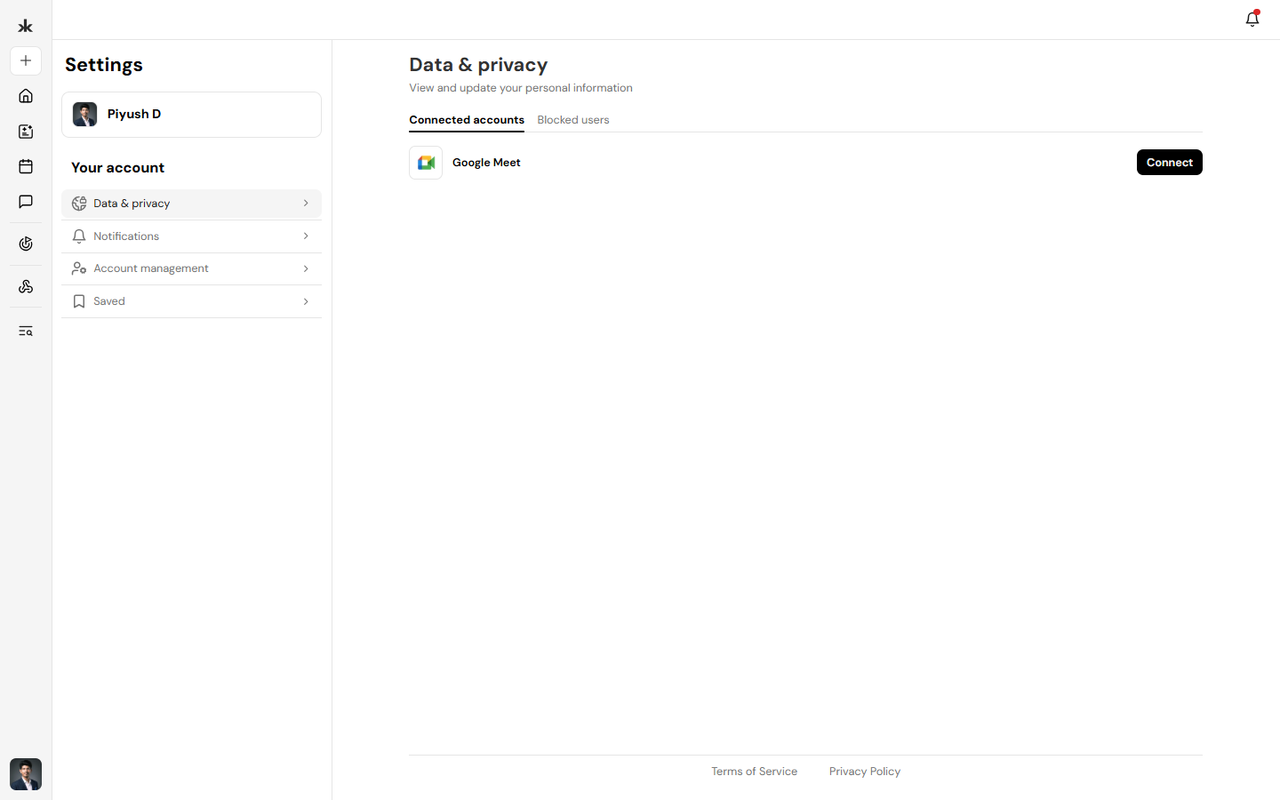
Connected Accounts allow you to link supported third-party services to your Key AI account. These integrations enhance your experience by enabling Key AI to work seamlessly with external applications. Currently, Key AI supports connecting your Google Meet account.
Connect Google Meet
To connect your Google Meet account:
- Sign in to your Key AI account.
- Navigate to Settings.
- Select Data & Privacy.
- Open the Connected Accounts tab.
- Locate Google Meet.
- Click Connect.
- Sign in to your Google account and grant the required permissions.
- Once authorization is complete, your Google Meet account will be connected to Key AI.
Why Connect Google Meet?
Connecting your Google Meet account enables Key AI to sync your events with your Google Calendar, helping you keep your schedule up to date across both platforms. This integration ensures your event information stays aligned, making it easier to manage and access your meetings from your calendar.
Manage Connected Accounts
You can manage your connected accounts at any time by navigating to:
Settings → Data & Privacy → Connected Accounts
From here, you can view your connected services and manage available integrations.
Best Practices
To get the most out of this integration:
- Connect the Google account you use for your meetings and calendar.
- Ensure you grant the required permissions during the connection process.
- Verify that your Google Meet account remains connected if you're experiencing calendar synchronization issues.
Frequently Asked Questions
Why should I connect my Google Meet account?
Connecting your Google Meet account allows Key AI to sync your events with your Google Calendar, helping you manage your schedule more efficiently.
Which connected accounts are currently supported?
Currently, Key AI supports connecting your Google Meet account.
Where can I manage my connected accounts?
Go to Settings → Data & Privacy → Connected Accounts to view and manage your connected services.
Notification Preferences↗
Overview
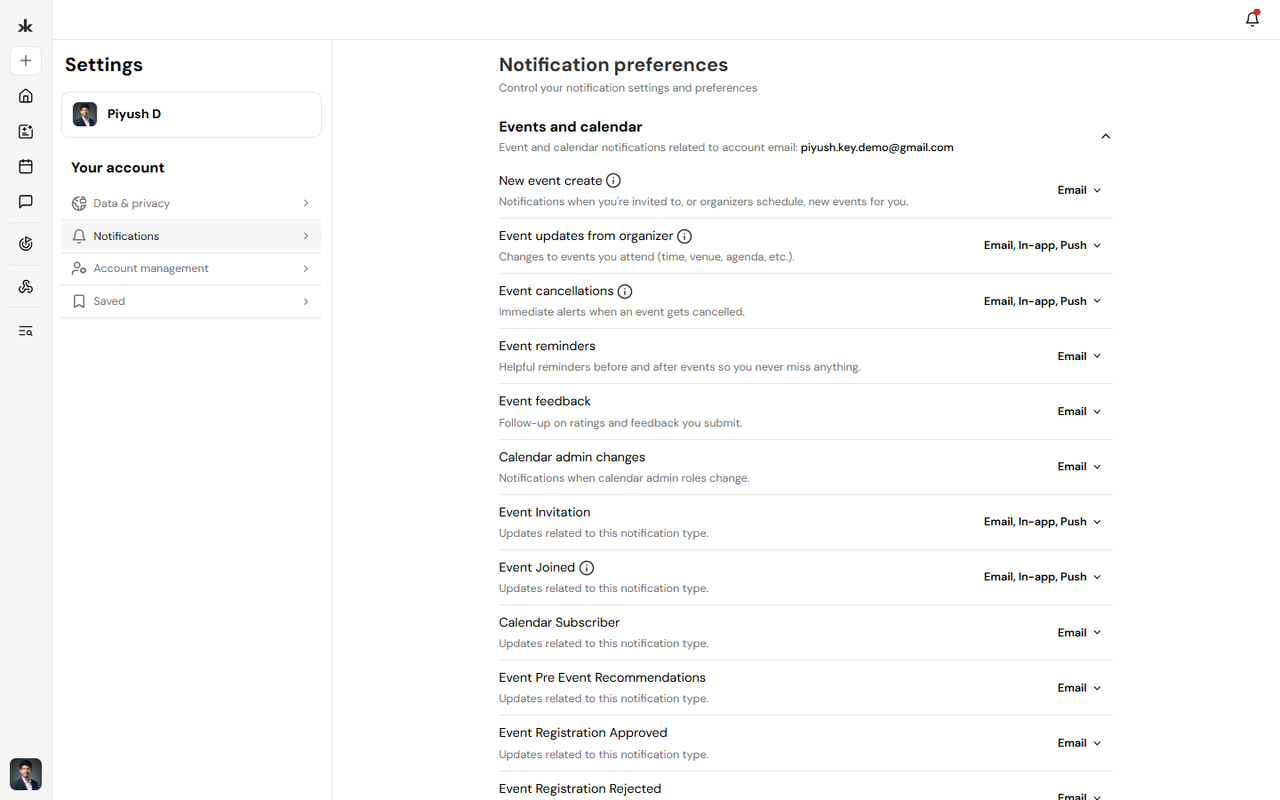
Notification Preferences allow you to control how you receive event-related notifications in Key AI. You can choose which event notifications you want to receive, helping you stay informed about the events that matter most while reducing unnecessary notifications.
Manage Notification Preferences
To update your notification preferences:
- Sign in to your Key AI account.
- Navigate to Settings.
- Select Notifications.
- Review the available event notification options.
- Enable or disable notifications based on your preferences.
- Your changes are saved automatically or after clicking Save, depending on your settings page.
Event Notifications
You can manage notifications related to your event activity, such as:
- Event invitations.
- Event updates.
- Event reminders.
- Other event-related notifications available in your account.
The available notification options may expand as new features are introduced.
Why Manage Notification Preferences?
Customizing your notifications helps you:
- Stay informed about upcoming events.
- Receive important event updates.
- Reduce unnecessary notifications.
- Personalize your Key AI experience.
Best Practices
- Keep event notifications enabled so you don't miss important updates.
- Review your notification preferences periodically.
- Update your preferences as your participation in communities and events changes.
Frequently Asked Questions
What notifications can I manage?
Currently, Key AI allows you to manage event-related notification preferences.
Will turning off notifications affect my event registrations?
No. Disabling notifications only changes how you receive updates. Your event registrations and participation remain unchanged.
Can I enable notifications again later?
Yes. You can update your notification preferences at any time from Settings → Notifications.
Mobile Number Verification↗
Overview
Mobile number verification lets you receive important updates from Key AI through WhatsApp or SMS, including event reminders, schedule changes, and community announcements.
Verification uses a one-time code to confirm your phone number. Once verified, your number is linked to your account and displays a Verified badge.
Where You Can Verify Your Phone Number
You can verify your phone number from several places within Key AI:
- Edit Profile - Verify your phone number from the contact information section.
- Profile Settings - Add or verify your phone number from your account settings.
- Event Pages - If you're attending an event, a Stay updated banner may appear with
the option to verify your phone number so you don't miss event updates.
Verify Your Phone Number
- Select Verify or Verify phone number.
- Choose how you want to receive your verification code:
- SMS
- Select Send code.
- Enter the 6-digit verification code you receive.
- Once verified, your phone number displays a Verified badge.
Didn't Receive a Code? If your verification code doesn't arrive:
- Wait a few moments and try again.
- Select Resend code to request a new verification code.
- If WhatsApp delivery isn't available, select Use SMS instead to receive the code by text
message.
Manage Your Verified Number
After your phone number has been verified, you can manage it at any time.
Open the options menu next to your verified phone number to:
- Edit your phone number.
- Unlink the number from your account.
- Remove the verified phone number.
If you change your phone number, you'll need to verify the new number before it can receive notifications.
Why Verify Your Phone Number?
Verifying your phone number helps ensure you receive important updates, including:
- Event reminders
- Event schedule changes
- Community announcements
- Other notifications sent through WhatsApp or SMS
Account Management↗
Overview
The Account Management section allows you to manage your Key AI account settings and access important account-related information. From this section, you can review your account details and manage available account options.
Access Account Management
To access your account settings:
- Sign in to your Key AI account.
- Click your profile avatar.
- Navigate to Settings.
- Select Account Management.
From here, you can view and manage the available account settings.
Manage Your Account
Account Management allows you to:
- Delete your account
Frequently Asked Questions
Where can I find my account settings?
Hover over your profile picture in the bottom-left corner and select Settings
Can I update my account information?
Yes. Account information can be managed from the appropriate settings pages, such as Profile, Notifications, and Data & Privacy.
Can I delete my account?
Yes your account can be deleted Go to Settings → Account management and then click on Delete account
Notifications↗
Depending on the notification type, Key AI can deliver notifications through:
- Push - Real-time alerts are sent to your device.
- Email - Notifications are sent to your registered email address.
The available notification channels may vary depending on the notification type.
Access Notifications
To view your notifications:
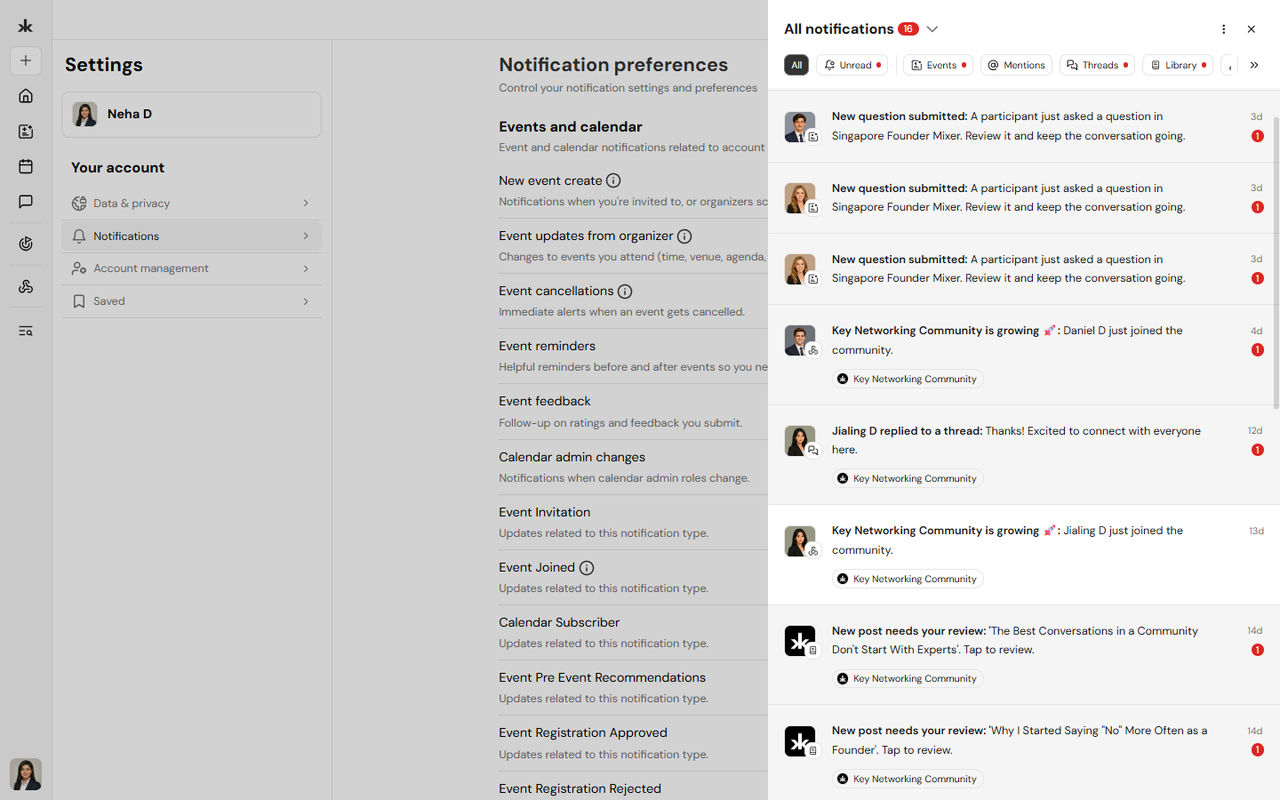
- Select the Notifications bell icon.
- The notification panel opens and displays your recent notifications.
You can switch between All notifications and notifications from a specific community.
Filter Notifications
You can filter notifications by category.
Available filters include:
- All - View all notifications.
- Unread - View notifications you have not yet read.
- Events - View event-related notifications.
- Mentions - View notifications where you were mentioned.
- Threads - View activity related to threads.
- Library - View Library-related notifications.
- System - View system announcements and account updates.
Manage Notifications
You can manage notifications directly from the notification panel.
Mark a Notification as Read or Unread
To change the read status of a notification:
- Open the notification's More options menu.
- Select Mark as read or Mark as unread.
Mark All Notifications as Read
To mark all unread notifications as read:
- Open the notification panel.
- Open the panel's options menu.
- Select Mark all as read.
Delete a Notification
To delete an individual notification:
- Open the notification's More options menu.
- Select Delete.
Notifications can be deleted individually. You cannot delete all notifications at once.
Push Notifications
Push notifications deliver real-time alerts to your device. Push notifications are disabled until you enable them. You can enable push notifications when Key AI requests permission or from Notification preferences using the Enable browser notifications option. If you do not grant permission, push notifications remain disabled until you enable them in your browser or device settings.
Email Notifications
Some notifications can also be sent to your registered email address. You can manage email notifications from Notification preferences where available. You can also unsubscribe from a notification category using the unsubscribe link included in the relevant email.
Notification Preferences
To manage your notification preferences:
- Open the notification panel's options menu and select Notification settings, or go to Settings → Notifications.
- Select the notification type you want to manage.
- Choose the available notification channels.
Available channels may include:
- In-app - Notifications appear inside Key AI.
- Email - Notifications are sent to your registered email address.
- Push - Notifications are sent to your device.
Detailed notification controls are currently available for event and calendar notifications, including new events, event updates, cancellations, reminders, feedback, and calendar changes. Some notifications related to essential account, security, or content activity may be required and cannot be disabled.
Community Digest Emails
Community Digest Emails let community administrators receive a summary of membership activity instead of separate email notifications for every join request. Rather than sending individual emails, Key AI combines pending approvals and recently joined members into a single digest based on the schedule you choose.
What's Included
Each digest includes membership activity for your community, including:
- Members waiting for approval
- A preview of pending member requests
- Recently joined members
If you manage multiple communities, each community has its own digest settings.
Choose Your Digest Frequency
You can decide how often you'd like to receive digest emails for each community.
- Open your community.
- Go to Settings > Notifications.
- Under the Community section, locate Digest.
- Choose one of the available options:
- Off - Don't receive community digest emails.
- Daily - Receive one digest email each day.
- Weekly - Receive one digest email each week.
- Monthly - Receive one digest email each month.
By default, the digest frequency is set to Daily.
How Digest Emails Work
When Community Digest Emails are enabled, they replace individual Pending Approval email notifications for that community. If you turn the digest Off, Key AI resumes sending individual email notifications whenever new membership requests require approval.
Who Can Receive Community Digests? Community Digest Emails are available to users who can approve membership requests, including:
- Community Creators
- Community Admins
Members without approval permissions do not receive community digest emails.
Best Practices
Choose a digest frequency that matches the activity level of your community:
- Daily works well for active communities with frequent join requests.
- Weekly is suitable for communities with moderate activity.
- Monthly provides a high-level summary for less active communities.
- Turn the digest Off if you prefer to receive individual approval emails.
Kai Smart Notifications
Kai proactively recommends people, opportunities, and content based on your goals, profile, and activity. These personalized recommendations are delivered through in-app notifications and push notifications to help you discover relevant connections and opportunities. Depending on your activity and preferences, you may receive the following notification types.
New Match
Kai has found a new person, opportunity, or resource that closely matches your interests or goals.
Weekly Picks
Receive a weekly summary of the people, opportunities, and Library content Kai recommends based on your activity.
Match Reminder
If you haven't acted on a recommended match or a saved item, Kai may send a reminder so you don't miss the opportunity.
Goal Follow-up
When something becomes available that matches a goal you've shared with Kai, you'll receive a notification letting you know about the new match.
People to Meet at an Event
Before an event you're attending, Kai may recommend attendees who are relevant to your interests or goals, helping you make valuable connections during the event.
Tell Kai What You're Working On
If Kai needs more information to personalize recommendations, you'll receive a prompt to share your current goals or areas of focus. Complete Your Profile
Kai may encourage you to complete your profile so it can provide more accurate recommendations and matches.
Smart Notifications for Community Library
Community administrators can enable Kai-powered notifications for Library content from their community settings.
Available options include:
- Smart notify on new posts - Kai recommends newly published Library content to
members who are most likely to find it relevant.
- Revive quiet threads - Kai encourages engagement by notifying relevant members
when Library discussions become inactive. These settings help deliver relevant content without sending notifications to every community member.
Community Membership Notifications 04/08/26 Key AI keeps you informed throughout the community joining process with notifications delivered in-app, through push notifications, and, where applicable, by email.
Community Invitation
You'll receive a notification when another member invites you to join a community. An invitation email is also sent to your registered email address.
Join Request Pending
If a community requires approval, you'll be notified after submitting your join request. You'll also receive an email confirming that your request is awaiting review.
Join Request Not Approved
If your request to join a community isn't approved, you'll receive a notification informing you of the decision. If the community administrator provides a reason, it will be included in the accompanying email.
Membership Requests for Administrators
Community administrators receive in-app notifications whenever new membership requests require approval. Requests are grouped by community, making them easier to review and manage.
Still need help?
Can't find what you're looking for? Our team is here.
Contact us