Kai AI
Use Kai to find people, discover opportunities, and create content across Key AI.
Kai AI↗
Kai is Key AI's AI assistant. It helps users find information, discover relevant people and opportunities, and create content across the platform. Kai can use relevant information available in Key AI, such as your profile, communities, events, opportunities, and Community Library content, to provide more useful and personalized responses.
Access Kai
You can access Kai from multiple locations across Key AI.
From the Home Page
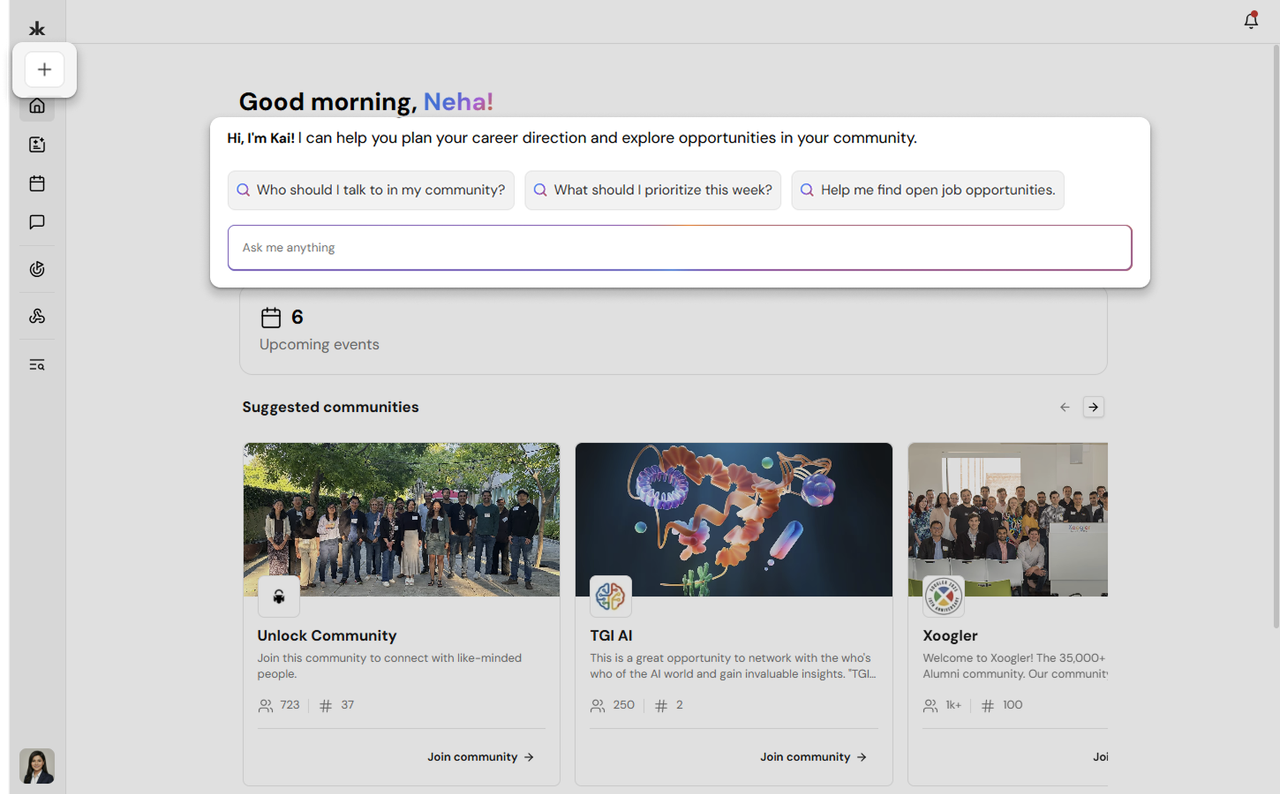
- Open the Home page.
- Use the Ask me anything field to enter your question.
- You can also select one of the suggested prompts to get started.
Start a New Chat
- Open the navigation sidebar.
- Select New Chat.
- Enter your question in the chat field and send it to Kai.
Continue a Previous Conversation
Your recent Kai conversations appear in the Recent Chats section of the sidebar. Select a conversation to reopen it and continue where you left off.
Ask Kai a Question
You can use Kai to ask questions about information available within Key AI.
Kai can help you:
- Find information about people.
- Learn more about communities.
- Find information about events.
- Discover relevant opportunities.
- Find information from available Community Library content.
- Get personalized recommendations.
To use Kai:
- Open Kai using any of the available access points.
- Enter your question or request.
- Submit your message.
- Review Kai's response.
You can continue the conversation with follow-up questions to explore a topic further.
Discover People and Connections
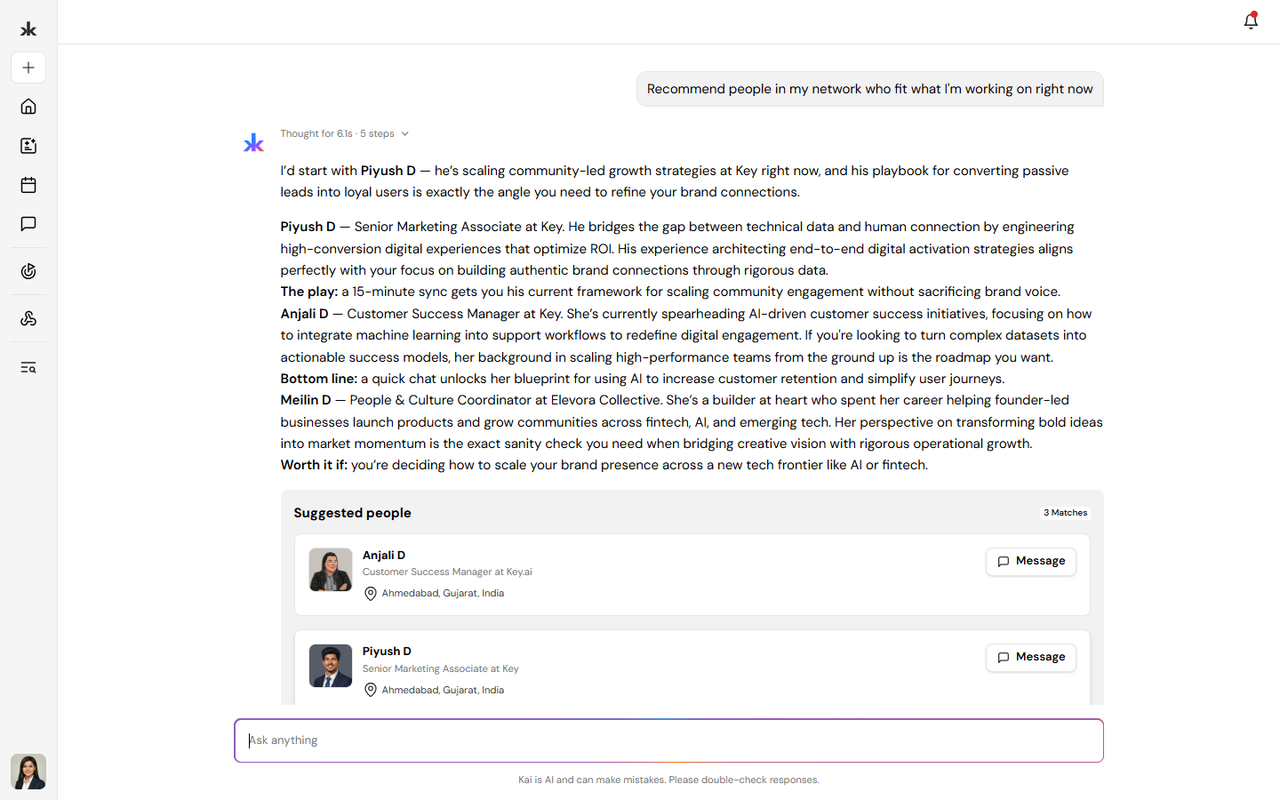
Kai can help you find relevant people based on your interests, goals, and information available on Key AI. For example, you can ask Kai to help you find people who:
- Have specific skills or experience.
- Work in a particular area.
- Share similar interests.
- May be relevant to a specific goal.
- Can help with a potential introduction.
Kai can help you discover relevant connections based on the information available on the platform.
Find Members Using Tags
Kai can use member tags when searching for people in a community. When an admin has added a tag to a member, Kai can use that tag to identify relevant members and surface them in search results. Tagged members are prioritized over more general role-based matches. For example, if a member is tagged as Speaker, searching Kai for speakers can help surface members with the Speaker tag more prominently.
Discover Opportunities
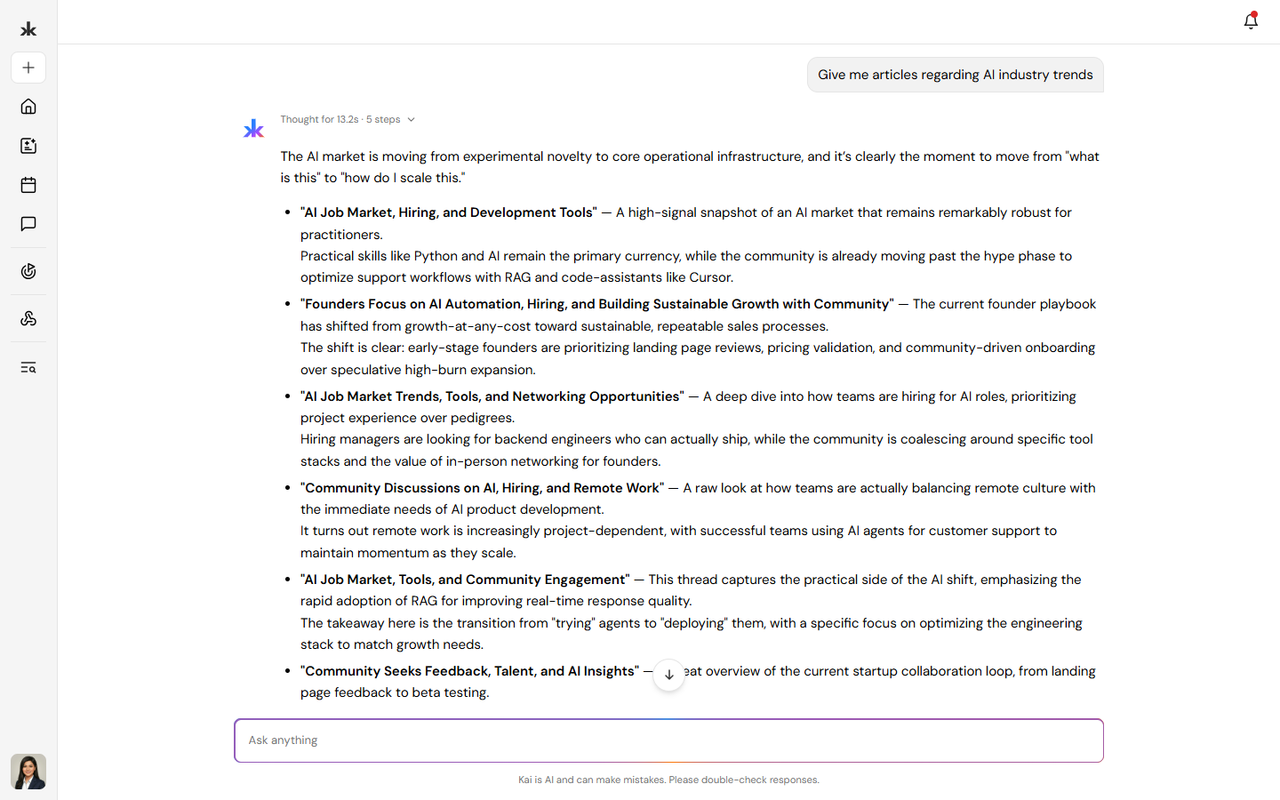
Kai can help surface opportunities that may be relevant to your goals and interests.
Recommendations may be influenced by:
- Your profile.
- Your selected goals.
- Your communities.
- Your events.
- Your interests.
- Other relevant information available on Key AI.
You can update your goals from the Opportunities section to receive different types of recommendations.
Ask Kai About Library Content
Kai can help you understand and explore content in the Community Library. When viewing a Library article, select Ask Kai to ask questions about that specific article.
You can ask Kai to:
- Summarize the article.
- Explain a specific section.
- Clarify a concept.
- Find key information.
- Answer questions based on the article's content.
Use Kai to Create Content
Kai can help you create and improve content in different areas of Key AI. Where available, you can use Write with Kai to generate or improve content.
Event Descriptions
When creating an event, you can use Kai to help write the event description. You can provide information about your event, and Kai can help generate a description that you can review and edit before saving.
Community Content
Kai can help create or improve certain community content, including:
- Community descriptions.
- Community share-preview content.
You can review and edit the content generated by Kai before saving or publishing it. Kai can also help with creating the community and editing the website.
Opportunities
When creating an opportunity, you can use Write with Kai to help generate the opportunity content. You can review and edit the generated content before publishing the opportunity.
Community Library Content
Write with Kai can help create content for the Community Library. You can review and edit the generated content before saving or publishing it.
Kai and Connected Platforms
When supported connectors are connected to a community, relevant information from those platforms may be used to identify opportunities.
Currently supported connectors include:
- Slack
Key AI can identify potential opportunities from relevant conversations and automatically create opportunities from that information. These opportunities can then appear in the Opportunities section.
Review and Edit AI-Generated Content
AI-generated content should be reviewed before publishing or saving.
You can:
- Review the content generated by Kai.
- Edit the content.
- Add or remove information.
- Make sure the content accurately represents what you want to share.
- Save or publish the final version.
Frequently Asked Questions
Where can I access Kai?
You can access Kai from the Home page using the Ask me anything field, start a conversation through New Chat, or reopen previous conversations from Recent Chats.
Can I continue a previous conversation?
Yes. You can open a previous conversation from Recent Chats and continue the conversation.
Can Kai create an entire event for me?
No. Event creation is completed manually. Kai can help generate the event description, but you must complete the event creation flow yourself.
Can I edit content generated by Kai?
Yes. You can review and edit AI-generated content before saving or publishing it.
Can Kai help me find people?
Yes. Kai can help you discover relevant people based on information available on Key AI and your goals or interests.
Can Kai help me find opportunities?
Yes. Kai can help surface opportunities relevant to your goals and interests.
Can Kai create opportunities automatically?
Potential opportunities can be automatically identified from relevant conversations through supported connected platforms, such as Slack and WhatsApp.
Can Kai help create content?
Yes. Where available, Write with Kai can help generate content for supported areas such as events, opportunities, communities, and Community Library content.
Kai Leads↗
Overview
Kai Leads is your personalized feed of people, opportunities, and content recommended by Kai based on your goals, profile, and community activity. Instead of browsing every opportunity across your communities, Kai surfaces a focused set of recommendations that are most relevant to you. Each lead includes an explanation from Kai describing why it was recommended and, when available, tools to help you connect with the person or opportunity.
Find Kai Leads
Open the Key AI mobile app and navigate to Kai Home. The Kai's recommendations for today section displays your current recommendations. Select the preview card to open the full Kai Leads feed. If recommendations aren't available, the section may not appear. This can happen if there are no recommendations available or if the feed couldn't be loaded. You can check again later or review previously saved leads.
Types of Kai Leads
Kai recommends several types of opportunities based on your interests and activity.
- Intro - Recommended people to connect with based on shared communities, events, or mutual interests.
- Talent - Jobs, contracts, internships, and hiring opportunities.
- Venture - Startup, fundraising, and co-founder opportunities.
- Resource - Grants, programs, credits, APIs, tools, and other resources.
- Plug - Limited personal offers shared by community members.
- Library - Community Library articles recommended based on your interests.
Each recommendation may also include:
- The community where it originated.
- Tags and additional details.
- Kai's explanation for the recommendation.
- Contact options when available.
How Kai Chooses Recommendations
Kai personalizes recommendations using information such as:
- Your goals and interests.
- Your profile information.
- Communities you've joined.
- Your interactions with previous recommendations.
Rather than showing every available opportunity, Kai prioritizes recommendations that best match your interests and activity.
Swipe Through Recommended Leads
Kai lets you quickly review recommended leads using a swipe-based experience. You can swipe through recommended leads to decide which connections you'd like to explore. If you accidentally swipe away from a lead or change your mind, use Undo to return to the previous lead.
Review Your Recommendations
Kai Leads uses a swipe-based experience that lets you quickly review recommendations. For each recommendation, you can:
- Save to review or act on it later.
- Discard if it isn't relevant.
- View Details to see additional information.
- Undo your most recent swipe if you changed your mind.
Saved Library recommendations are added to your saved Library items, while other saved recommendations are available from your saved leads.
Connect with Recommended Leads
For recommendations that include contact information, Kai helps you start the conversation.
You can:
- Edit the suggested introduction message.
- Use Rewrite with Kai to generate a new version of the message.
- Choose how you'd like to contact the person using Send via.
Depending on the information available, supported communication methods may include:
- Key AI Direct Message
- Slack
Available contact methods vary for each recommendation. Library recommendations don't include messaging options. Instead, select Read more to open the recommended article.
Stay Organized
Kai presents a focused batch of recommendations rather than an endless feed. After you've reviewed all available recommendations, you'll see an All caught up! message. Kai will continue generating new recommendations, and you'll receive notifications when additional leads become available. You can revisit your saved recommendations at any time from your Saved Leads list.
Improve Your Recommendations
The quality of your recommendations improves as Kai learns more about your interests. For the best experience:
- Keep your profile up to date.
- Tell Kai what you're working on and what you're looking for.
- Save recommendations that interest you.
- Discard recommendations that aren't relevant.
- Use Undo if you accidentally save or discard a recommendation.
These actions help Kai deliver more relevant recommendations over time.
introduction message, Rewrite with Kai, Send via options, Save/Discard actions, and the All caught up! Screen.
Still need help?
Can't find what you're looking for? Our team is here.
Contact us